
Introducing AI Observability: Trace Every AI Agent Request from Prompt to Pod
October 21, 2026
TL;DR
Logz.io AI Observability provides end-to-end tracing for AI agents and LLM applications. Built on OpenTelemetry, it lets you trace every request from prompt to backend service, visualize multi-step agent execution, isolate root causes across models and infrastructure, and track token usage per step, all alongside your existing logs, metrics, and traces.
Bottom line: Schedule a demo and we’ll show you how it’s done. Book a demo →
An AI agent might be tasked with a multi-step operation, encountering silent errors or querying incorrect parameters along the way before finally returning a clean, confident answer. To the end user, the agent appears to have succeeded completely, while the underlying flaws, failed tool calls, and incorrect data references are only visible in the trace.
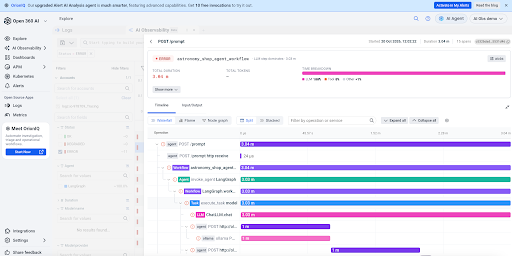
That gap is why we built AI Observability, a new capability in the Logz.io platform for engineering teams who develop and run their own AI agents and LLM apps in production.
Every request your agents handle becomes a single trace you can follow through each model call and tool call, down to the backend services behind them, so when an agent fails you can see exactly where it broke.
An AI request is a chain, not a single call
Early LLM features were usually one prompt and one response. Production AI looks different. Agents now sit on the critical path of customer-facing products, and a single request can include a prompt, several model calls, a retrieval, multiple tool calls and handoffs between agents. All of that runs on ordinary application code that talks to databases, internal APIs, queues and Kubernetes pods.
Most existing tools cover only one part of that chain. When something goes wrong, the cause may not be in the model at all. A slow retrieval store, a failing downstream API, a saturated pod or a timeout can all produce the same symptoms, and teams end up piecing the answer together across several systems.
Agents also don’t fail the way traditional software does. They choose their own tools and look for alternative paths when one fails, which means a run can return a successful-looking answer while things went wrong behind it. Add non-determinism, where the same input that fails today works tomorrow, and debugging from one-off repros rarely gets you to a root cause.
How we use it on our own agents
We run AI Observability on the agents we build ourselves first, including the agents behind OrionIQ, our AI agent that investigates incidents and drives root cause analysis inside Logz.io.
Two patterns keep coming up.
The first is the hidden failure, such as an agent that summarized a user’s issues from the wrong account. The user saw an answer and moved on. The timeline showed two failed tool steps, the HTTP calls under them that failed, and the account ID the successful call actually queried. Without that view, nothing about the run would have looked wrong.
The second is cost. An agent can answer a simple question correctly while making far more tool and model calls than it should, and nobody notices until the bill arrives. Knowing how much you spent is a billing question. Knowing which agent, which step and which loop of repeated calls caused it is an observability question, and per-step token counts are how we answer it.
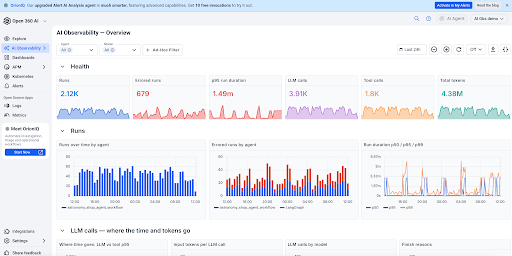
What AI Observability shows you
Every AI request
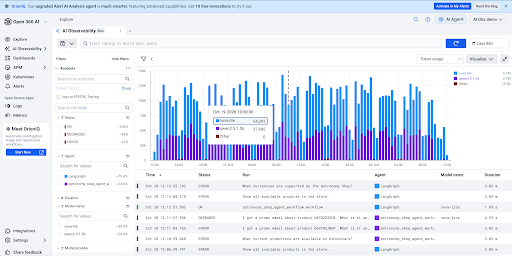
Each request appears as one row with its time, status, duration, agent, model, total tokens and number of steps. You can filter by agent, model, provider, status, thread or any span attribute, and use smart search and tags to find the runs that matter. Alerts run through the Logz.io alerting you already use, with thresholds on error count, latency or tokens for AI spans.
That makes questions like “which requests failed in the last hour?” or “which agent is slowest on this model?” a filter instead of an investigation.
Every step of an agent request, in order
Open a request to see every step laid out on a single timeline, color-coded by step type. Clicking into any step reveals the complete prompt and response broken out by role, along with the tool name, arguments, and returned results. You also get a detailed breakdown of model usage, input and output tokens, step duration, and child spans showing the underlying HTTP and database calls.
This gives you immediate insight into whether an agent selected the right tool and processed accurate data, even when the final output appears successful. If you need to hand off the investigation, you can export the full conversation to Markdown and share it in a ticket or Slack thread.
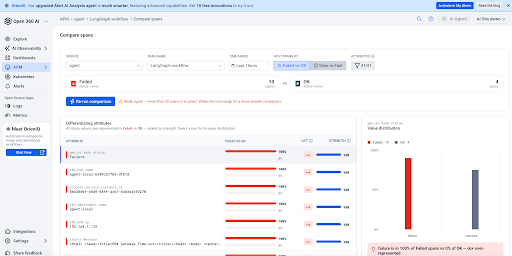
What the bad requests have in common
Some problems only show up as a pattern across many runs. Pick a group of problem requests (failed, slow or token-heavy) and compare them with a baseline of normal ones. Compare ranks the attributes that show up much more often in the problem group, such as a model version, a tool, a region, a prompt version or a tenant. It turns “some requests go wrong” into a specific reason why those ones did.
Which step burned the tokens
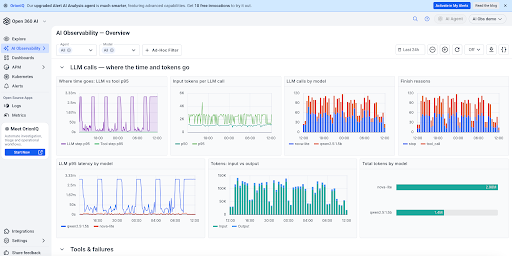
Tokens are counted for every step and rolled up by request, agent and model. When usage spikes, you’re led to a specific step in a specific agent instead of a surprise on the monthly invoice. Total tokens per request are sortable in the list, and an overview dashboard (in beta) shows volume, errors, latency and tokens by agent and model.
Your AI traces, next to everything else you already monitor
AI Observability isn’t a separate tool bolted onto your stack. Your agent requests land in the same Logz.io account as your service traces, logs and infrastructure metrics. A tool step’s child spans lead straight into the services it called, so a slow lookup can be followed into the API, the database query and the pod behind it without switching products. If you’re new to how this works across services, our guide to distributed tracing in Logz.io covers the basics.
It’s also built on open standards. AI Observability ingests OTLP and works with OpenLLMetry and the OpenTelemetry GenAI semantic conventions, so there’s no proprietary SDK to adopt, no second pipeline to run and no separate bill from another vendor. Teams already instrumented with OpenLLMetry can send the same data to Logz.io and keep their existing evaluation tools in place. For more on the standard underneath, see our post on OpenTelemetry observability best practices.
Common use cases and real-world scenarios
Production AI agents introduce novel failure modes and operational challenges that traditional monitoring tools cannot catch. Here are the primary use cases AI Observability addresses:
1. Detecting hidden and silent agent failures
Agents often mask errors by gracefully recovering or summarizing incomplete data. While the end user receives a seemingly valid response, underlying issues can compromise accuracy:
- Wrong-but-Successful Answers: An agent completes its execution chain successfully, but queries an incorrect account ID or parameter along the way, delivering plausible yet incorrect output.
- Tool & Dependency Failures: Downstream API timeouts, database errors, or failed retrieval steps occur silently. By tracing every step down to backend HTTP and DB calls, you pinpoint exactly where the chain degraded.
2. Controlling runaway costs and inefficiency
Unchecked model invocations and agent reasoning loops can inflate telemetry and API costs without clear user impact:
- Agent Reasoning Loops: Agents can enter repetitive loops, calling the same tool repeatedly with slightly altered parameters, burning thousands of tokens to answer a single query.
- Per-Step Token Breakdown: Isolate high-cost invocations by inspecting token usage on a per-step basis, making it simple to identify inefficient prompts, model choices, or tool iterations.
Set up in three steps
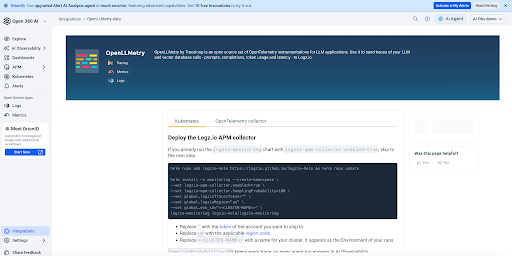
You don’t need a new SDK or a second pipeline. If your app already sends OpenLLMetry spans, you only change one endpoint.
- Instrument. Add OpenLLMetry (Python or TypeScript) or any OpenTelemetry GenAI instrumentation.
- Connect to Logz.io. Use the same exporter config you already use for traces.
- Start monitoring. Requests appear as soon as the spans arrive.
AI Observability works with: OpenAI, Anthropic, Amazon Bedrock, LangChain, LangGraph, LlamaIndex, Python, and TypeScript.
Instrument your first agent with us
We’re working closely with a small group of customers, and participants get:
- Hands-on help instrumenting their first AI app
- Direct sessions with the product team, where their requests shape the roadmap
- Credits toward the telemetry their AI app generates during the program
Request access → and your account manager will follow up within a few business days to get you set up.
FAQs
Logz.io AI Observability provides end-to-end tracing for AI agents and LLM applications, allowing engineering teams to trace requests from prompt to backend infrastructure alongside their existing logs, metrics, and traces.
It tracks each request as a single trace across prompt executions, model invocations, tool calls, and backend service dependencies like databases and microservices.
No, it is built on open standards like OpenTelemetry and OpenLLMetry, ingesting standard OTLP data without requiring proprietary SDKs.
Token counts are measured per step and rolled up by request, agent, and model, allowing teams to pinpoint exact steps causing token or cost spikes.
For consumption customers, pricing is based on gigabytes of trace data ingested, with no additional per-seat or per-LLM-span fees.
You Might Also Like
