
Vulnerability Threat Sweep: New Vulnerabilities, Checked Against What You Actually Run
November 18, 2026
TL;DR
In most companies, a security team owns vulnerabilities. But in 2026, new vulnerabilities will come out more than twice as fast as in 2025, and attackers will use some of them on the day they come out. Vulnerability Threat Sweep is a new OrionIQ AI agent that adds a second layer of security, from the logs and metrics your teams already send to Logz.io. It finds the services that run an affected version and looks for attack signs. It is read-only by default and only reports what it finds. It needs no SIEM, and your first 10 invocations are free.
Bottom line: Schedule a demo and we’ll show you how it’s done. Book a demo →
More vulnerabilities, less time to act
New vulnerabilities come out at a record pace: about 98,000 by mid-November 2026, already twice as many as in all of 2025 (CVE.icu). Attackers keep up. Of the vulnerabilities that attackers started to use in the first half of 2026, almost 1 in 4 were used on or before the day they were published (VulnCheck). And vulnerabilities are now the top way attackers get in: 31% of breaches start with one (Verizon’s 2026 Data Breach Investigations Report).
Scanners and a patch process stay important. But scanners see what is installed, and patches take time. Three questions stay open:
- “Does it affect what we actually run?”
- “Which of our services run an affected version?”
- “Is anyone already trying it on us?”
The answers are often already in your observability data.
Not a new job: a second layer of security
To be clear: vulnerability management stays with your security team. The agent does not move it to your SREs or platform engineers. It adds a second layer, from data you already have.
Your observability platform often sees parts of your systems that security tools miss. Every team sends its logs and metrics there, including new services and containers that a scanner may not cover yet. And it shows what runs right now, not what was installed at the last scan. So it makes sense for the security team to look there too.
Send the report to your security team, to the service owners, or to both. The security team gets evidence from live systems. The service owners get steps they already know: upgrade a version, send a log source or add an alert. If you have no security team, it is your first layer.
From your logs to a ranked report
By default, the agent runs every Monday at 08:00 and checks vulnerabilities with a severity of 8.5 of 10 or higher. You can change both in the agent’s settings, for example to run it every day. Each invocation does five things:
1. It finds what you run. It finds the products, runtimes and versions in your logs, metrics, container images and scanner alerts.
2. It lists their vulnerabilities. It lists the ones from the last 90 days. The ones attackers already use, from CISA’s catalog, go first.
3. It checks your versions. It finds the services that run an affected version.
4. It looks for attack signs. It searches your logs and metrics since the last invocation.
5. It tells you what to do. It lists the steps, most urgent first.
The report uses plain words, such as “severity 8.8 of 10” and “attackers already use it”.
Here is the top of one. The services are made up:
Example:
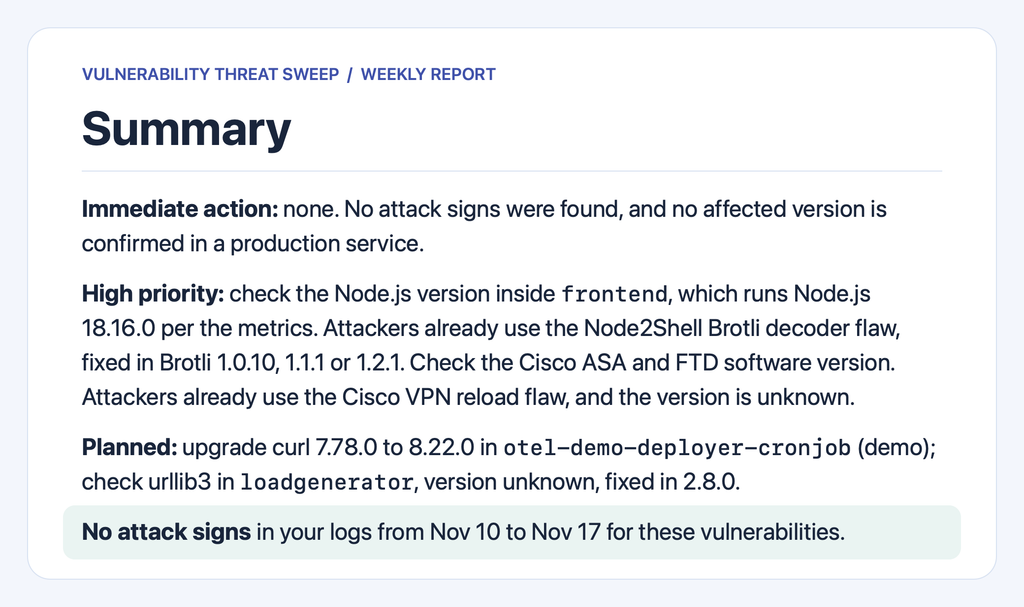
The report goes to the agent panel, and to email, Slack or Microsoft Teams.
Built to be safe to hand over
- Read-only. It never creates, changes or deletes an alert, a rule or a setting.
- You decide. Every step in the report is a step for a person.
- Urgency from risk, not from the score. Attack signs and vulnerabilities that attackers already use come first.
- One fix is one step. If one upgrade fixes 14 vulnerabilities, the report shows one step.
- Honest about what it can’t see. When the logs can’t show a version, the report says so and names the log source to send.
What this looks like in practice
Monday, 08:00. The report lands in the Slack channel that your platform and security teams share. One step for today: a vulnerability that attackers already use may affect cache-01, and the logs don’t show its version.
That afternoon. A platform engineer checks the version. It is affected. The security team agrees, and the platform team upgrades Redis. MySQL follows later that week.
Next Monday. The report is one line: “No action needed. No attack signs from Nov 16 to Nov 23.”
More than a report
The report is where the agent starts. Add a runbook, and the agent follows your team’s own steps on every invocation. Connect OrionIQ integrations, such as Jira, GitHub or Confluence, and it reads them too. For example, your runbook can tell it to look for an open Jira ticket before it lists a step, or to find the owner of each service on your service catalog page.
Security in layers, at the speed of new vulnerabilities
No single tool catches everything, and new vulnerabilities come out faster every year. Vulnerability Threat Sweep adds a layer that costs your teams little time. It reads the advisories, checks the versions and searches the logs, without being asked. People stay in charge: the agent reports, and your teams decide.
FAQs
Yes, and it stays theirs. The agent does not replace their scanners or SIEM. It adds a check from your live data, and you can send them the report.
Open the OrionIQ agent marketplace in your Logz.io account and select Vulnerability Threat Sweep. Choose the accounts to check and who gets the report.
Your first 10 invocations are free. A daily schedule uses them faster. After that, it keeps running, and each invocation is billed at your account’s price until you turn it off.
You Might Also Like
From Alert Noise to Automated Action: The Case for Workflow-Driven Monitoring
